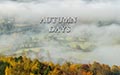
A new slideshow and my last for this year. Photographs taken during the last three months of the year over the last few years. Res: 1920x1200.
RMS January 24, 201610 yr review_336 Report Author stats Wonderful, wonderful photography and choice of music. I can understand why you live nearby! Great lighting and understand time taken to gather the images. Thanks for allowing me to enjoy the sequence. Regards, Roger.
Anthony December 26, 201510 yr review_333 Report Author stats Maureen, This is a stunning AV. It portrays another world of beauty. The music with the transitions create a dreamy few minutes. Thoroughly enjoyed it. Thank you. Anthony
JudyKay December 23, 201510 yr review_325 Report Author stats Beautiful images. I love the ending. What a beautiful place to visit, or live! Thanks.
Eddy Roose December 22, 201510 yr review_323 Report Author stats 3 of 3 members found this review helpful 3 / 3 members So serene and absolutely peaceful. Beautiful pictures !!! Congratulations, Maureen
Bert December 22, 201510 yr review_322 Report Author stats 3 of 3 members found this review helpful 3 / 3 members Maureen, As you always have in your shows, beautiful photography and great light on the pictures. Thanks for posting. Bert


Join the conversation
You can post now and register later. If you have an account, sign in now to post with your account.