
Skip to content
View in the app

A better way to browse. Learn more.

Slideshowclub.Com

A full-screen app on your home screen with push notifications, badges and more.

To install this app on iOS and iPadOS
  1. Tap the Share icon in Safari
  2. Scroll the menu and tap Add to Home Screen.
  3. Tap Add in the top-right corner.
To install this app on Android
  1. Tap the 3-dot menu (⋮) in the top-right corner of the browser.
  2. Tap Add to Home screen or Install app.
  3. Confirm by tapping Install.

Schools Out - Surfs Up PTE8 Deluxe

(0 reviews)

1 Screenshot

A slide show by Beckham Digital. www.beckhamdigital.com.au

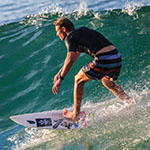
The images were all shot in one location and on one evening. The location was Noosa National Park, Queensland Australia. The vantage point here (when the surf is right) allows the surfers a very long surf at right angles to the beach, which is pretty good for photography. Of course it helps a lot when the surfers are so good at their sport too. Good shots were easy to capture this evening and we actually went there for a sunset that didn't come off.

A combination of the right place, the right time, the lighting was bright, but not too contrasty and some great surfers were on the water.

User Feedback

Join the conversation

You can post now and register later. If you have an account, sign in now to post with your account.

Guest
  • This will not be shown to other users.

  • Your review Required
    Add a review...

Account

Navigation

Search

Search

Configure browser push notifications

Chrome (Android)
  1. Tap the lock icon next to the address bar.
  2. Tap Permissions → Notifications.
  3. Adjust your preference.
Chrome (Desktop)
  1. Click the padlock icon in the address bar.
  2. Select Site settings.
  3. Find Notifications and adjust your preference.