Eddy Roose August 10, 20196 yr review_663 Report Author stats It must have been a beautiful trip. As usual: beautiful pictures (even when the weather was not ideal for photographers…) & a good editing of the pictures with the choosen music. Maby a litte bit to long. Congratulations for the work you have done. Greetings, Eddy Response from the author: Thanks, Eddy. I'm inclined to agree about the length but finding the right music gave me the biggest problem. Hope you are still travelling, seen nothing from you of late.
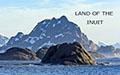
Mickp August 7, 20197 yr review_662 Report Author stats All your skill and artistry are as good if not better than ever. A wonderful way to start the day with fantastic views of Greenland. Mickp
Lin Evans August 6, 20197 yr review_661 Report Author stats Beautiful imagery of a place most of us will never get the opportunity to visit! Thanks for presenting this !!! Lin

Join the conversation
You can post now and register later. If you have an account, sign in now to post with your account.