
Skip to content
View in the app

A better way to browse. Learn more.

Slideshowclub.Com

A full-screen app on your home screen with push notifications, badges and more.

To install this app on iOS and iPadOS
  1. Tap the Share icon in Safari
  2. Scroll the menu and tap Add to Home Screen.
  3. Tap Add in the top-right corner.
To install this app on Android
  1. Tap the 3-dot menu (⋮) in the top-right corner of the browser.
  2. Tap Add to Home screen or Install app.
  3. Confirm by tapping Install.

The Fire Trail PTE8 Deluxe

(1 review)

1 Screenshot

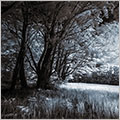
This is the second (very short) slide show to enable me to show some of the earliest Infra-Red images I have taken with a Canon 5D Mk2 camera converted to shoot Infra-Red.

This is one of the most interesting and stimulating photographic projects I have had for a long time. Both from a taking point of view and also the manipulating of infra-red images. However, I am well aware that with audio visual we can sometimes get so wrapped up in our own projects that we fail to see that we are boring the pants off of everyone else but ourselves.

I hope not

User Feedback

Join the conversation

You can post now and register later. If you have an account, sign in now to post with your account.

Guest
  • This will not be shown to other users.

  • Your review Required
    Add a review...


Account

Navigation

Search

Search

Configure browser push notifications

Chrome (Android)
  1. Tap the lock icon next to the address bar.
  2. Tap Permissions → Notifications.
  3. Adjust your preference.
Chrome (Desktop)
  1. Click the padlock icon in the address bar.
  2. Select Site settings.
  3. Find Notifications and adjust your preference.