
Skip to content
View in the app

A better way to browse. Learn more.

Slideshowclub.Com

A full-screen app on your home screen with push notifications, badges and more.

To install this app on iOS and iPadOS
  1. Tap the Share icon in Safari
  2. Scroll the menu and tap Add to Home Screen.
  3. Tap Add in the top-right corner.
To install this app on Android
  1. Tap the 3-dot menu (⋮) in the top-right corner of the browser.
  2. Tap Add to Home screen or Install app.
  3. Confirm by tapping Install.

Russian Onions PC

(1 review)

1 Screenshot

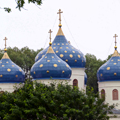
‘Russian Onions’ is a collection of the distinctive architectural church domes I photographed on a recent trip to Russia. These domes were created to allow the weight of the heavy Russian snows to slide off. Though I was captivated by these domes, I was even more impressed attending the Orthodox services in the churches. However, in most of them, photography was not permitted. One that allows photography is the Church of Our Savior on Spilled Blood in St. Petersburg (the last set of images). (3:41)

User Feedback

Join the conversation

You can post now and register later. If you have an account, sign in now to post with your account.

Guest
  • This will not be shown to other users.

  • Your review Required
    Add a review...

Account

Navigation

Search

Search

Configure browser push notifications

Chrome (Android)
  1. Tap the lock icon next to the address bar.
  2. Tap Permissions → Notifications.
  3. Adjust your preference.
Chrome (Desktop)
  1. Click the padlock icon in the address bar.
  2. Select Site settings.
  3. Find Notifications and adjust your preference.